


Better, faster, more strategic UX

© 2025 BuildUX


Better, faster, more strategic UX
© 2025 BuildUX

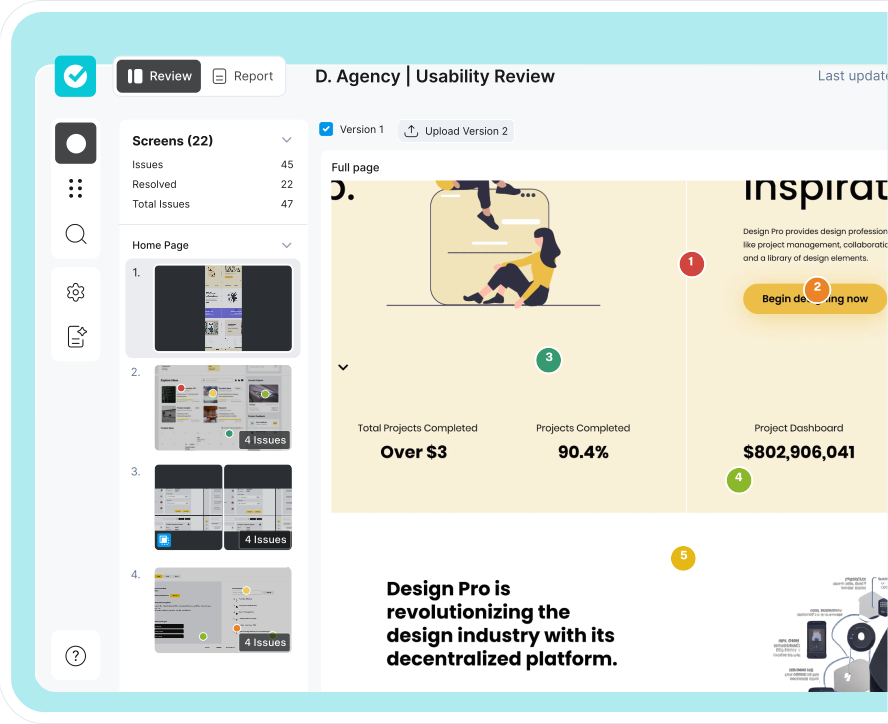
Upload design files ready for development. Mark specific areas visually with notes for the team. Communicate requirements with ease and precision.

Collect feedback on your site's current version. Upload annotated screenshots with our extension. Catch bugs and design changes during development.

Quickly spot and tag usability or heuristic issues from a predefined list. Give clear, actionable UX feedback on designs.

Upload only key design snippets, no need to look through multiple files. Tag issues in Jira, and link changes to Figma. Speed up development.








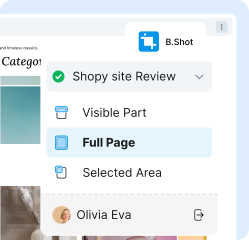
Upload screenshots easily with the extension.
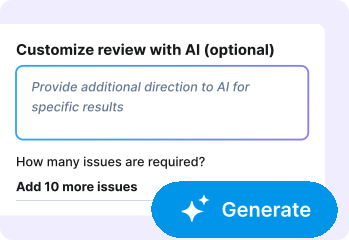
Speed up your reviews with AI assistance.

Don’t let your insights sit. Share it with your team.

Tag feedback to Figma or Jira and get your dev moving.
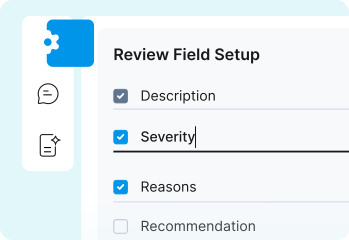
Select your fields and pre-filled forms as you need.

Add tasks to Azure. Stay connected with your workflow.
How to perform a design review?

Performing a design review involves systematically evaluating a design against user goals, usability standards, accessibility principles, and product requirements to identify areas of clarity, friction, or misalignment. This typically includes examining task flows, interaction patterns, visual hierarchy, content clarity, and behavior under constraints. A structured design review matters because it ensures that design decisions support user needs and business objectives rather than relying on subjective preference or isolated feedback.
How to give feedback on a design?
Giving feedback on a design means assessing how well the design supports user tasks, conveys meaning, and guides interaction, then communicating observations in a clear, actionable, and objective way. Useful feedback focuses on problems, evidence, and user impact rather than personal taste — for example, highlighting confusion in a flow or inconsistency in hierarchy and explaining how it affects comprehension. Good design feedback matters because it accelerates iteration, reduces ambiguity, and ensures changes address real usability concerns rather than noise.
How to review UI design?
Reviewing UI design involves evaluating the interface for clarity, consistency, hierarchy, affordance, spacing, and alignment with established design systems or usability heuristics. This is done by walking through core user tasks, examining how visual elements guide attention, and checking whether controls and content support user expectations. A strong UI review matters because it prevents visual decisions from creating cognitive friction or slowing user understanding, especially in high-frequency or high-stakes interactions.
How do I review design work?
Reviewing design work requires stepping through the experience from the user's perspective, evaluating whether each screen or interaction supports the intended goal, and identifying where confusion or unnecessary effort occurs. It is applied by assessing flow logic, content clarity, decision points, accessibility, and alignment with user research insights. This matters because design quality is defined by how well it supports real use, not by visual polish alone — and thoughtful review ensures that decisions advance usability and product outcomes.
What is Heuristic Evaluation?
Heuristic evaluation is an expert review method where a design is assessed against established usability principles — such as visibility of system status, match with real-world expectations, error prevention, flexibility, and aesthetic minimalism. Evaluators analyze the interface to identify violations of these heuristics and the severity of their impact on the user experience. This method matters because it exposes usability issues early and efficiently, without requiring extensive user testing to uncover fundamental design flaws.
How to conduct a heuristic evaluation?
Conducting a heuristic evaluation involves selecting a set of usability heuristics (commonly Nielsen's 10), reviewing the interface screen by screen, documenting violations of each principle, and rating the severity based on frequency, impact, and persistence. Evaluators then synthesize these findings into recommendations that reduce friction, remove ambiguity, and improve task completion. This matters because heuristic evaluation offers a fast, structured way to uncover systemic UX problems before they become costly or entrenched.
How many usability heuristics are there?
There are ten widely recognized usability heuristics, most commonly attributed to Jakob Nielsen and used across the UX industry as foundational principles for evaluating interface usability. These heuristics serve as a framework for diagnosing issues related to clarity, control, consistency, error prevention, and overall user efficiency. They matter because they provide a research-backed, time-tested checklist that helps teams identify usability problems quickly without requiring full-scale user testing for every iteration.
What are Nielsen's 10 usability heuristics?
Nielsen's 10 usability heuristics are 1) Visibility of system status, 2) Match between system and the real world, 3) User control and freedom, 4) Consistency and standards, 5) Error prevention, 6) Recognition rather than recall, 7) Flexibility and efficiency of use, 8) Aesthetic and minimalist design, 9) Help users recognize, diagnose, and recover from errors, and 10) Help and documentation. These heuristics are applied during expert reviews to identify breakdowns in understanding, navigation, or task progression. They matter because they remain one of the most reliable and efficient tools for assessing usability in digital products, even decades after their introduction.
